Trine 6: Co-op Cameras and Puzzle Clarity Improvements
Hello, adventurers!
When you’re adventuring with friends, there’s plenty to keep track of: your hero, your party, the occasional unfriendly creature, and whatever puzzle stands between you and the path ahead. The camera plays a big part in helping you make sense of it all.
Camera feedback was one of the most common themes across player groups after our July playtest. Two things stood out in particular: having your own camera in online co-op matters to many of you, and busy multiplayer puzzles could be difficult to read.
In our August development update, we shared that we were working on both. Today, we’d like to take a closer look at what’s changed and how your feedback helped shape those decisions.
More freedom for the online co-op camera
Online players now have their own cameras, with shared views in certain puzzle areas. We thought it might be interesting to some to explain how we got here, so let’s rewind a little.
Our original co-op design, which became the foundation for Freestyle Puzzle Mode, put a strong emphasis on everyone taking part. We wanted the camera to support that, too. Rather than letting one player rush ahead and pull the rest of the party past a puzzle, we tried bringing anyone who moved too far ahead back to the group.
We liked how this encouraged everyone to play through each challenge, so we tried it in online co-op as well. Your feedback made it clear though, that this approach could feel restrictive, and that having your own camera online mattered to many of you.
With that in mind, we’ve returned to the approach used in Trine 5, with more time to refine how it works in Trine 6. During online play, each player has their own camera, so moving ahead of your friends no longer warps you back to them.
In certain puzzle areas, cameras share a view so you can see what’s happening and help friends who are still making their way through. Once you move forward out of that shared area, you’ll return to your own camera.
Trine 5 used shared camera areas too, but those were added late in development, leaving some rough spots we would have liked more time to address. For Trine 6, we’ve been setting them up far ahead of launch. That gave us a chance to gather feedback during the October playtest and gives us more time to find and fix awkward situations before launch.
A better view when sharing the camera
We’ve also changed how the shared camera follows your party.
Previously, it followed the player furthest behind almost exclusively. That helped keep the group together, but it could leave the player out front feeling boxed in as the camera moved away from them. Sometimes, they could even lose sight of their own hero.
The updated camera gives more consideration to the players ahead. The player furthest behind still stays in frame and limits how far the camera can move, but the view no longer follows them so rigidly. This gives players out front more room while keeping their friends in sight and is especially useful when playing in couch co-op.
Making multiplayer puzzles easier to read
Some of our larger multiplayer puzzles looked more complicated than they needed to. This was especially noticeable in three- and four-player sessions, where several interaction points could appear on screen at once.
In our August update, we called these “puzzle consoles.” In the game’s interface, you’ll see two terms: Environmental Manipulation, which keeps your hero in place while you use alternate controls, and Trine Manipulation, which lets you control puzzle elements while continuing to move your hero.
We’ve been adapting suitable multiplayer puzzles to use Trine Manipulation, building on how some single-player puzzles already work. When you enter one of these areas, you’re automatically given control of certain puzzle elements. You can then operate them with the indicated buttons while continuing to move your hero.
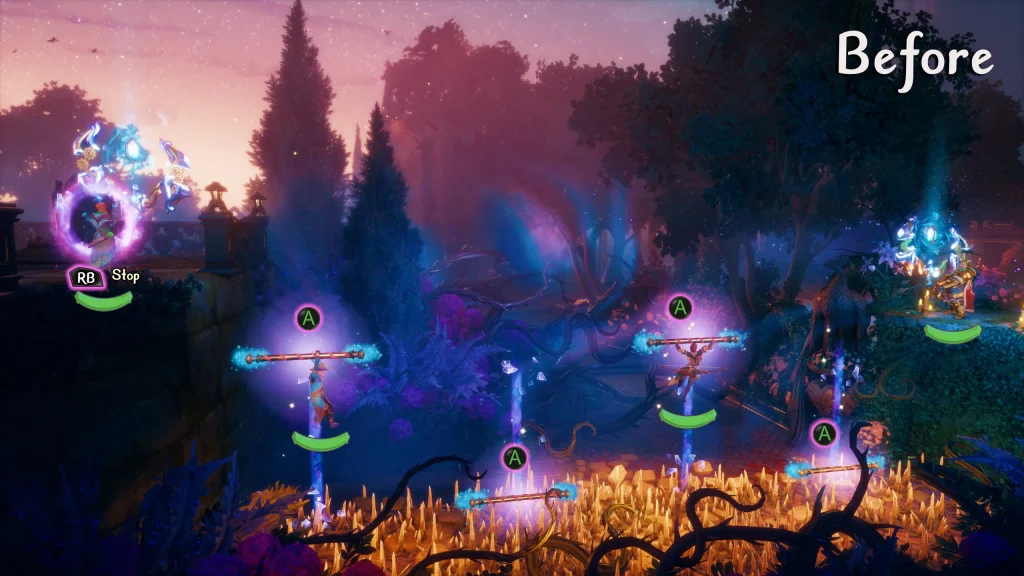
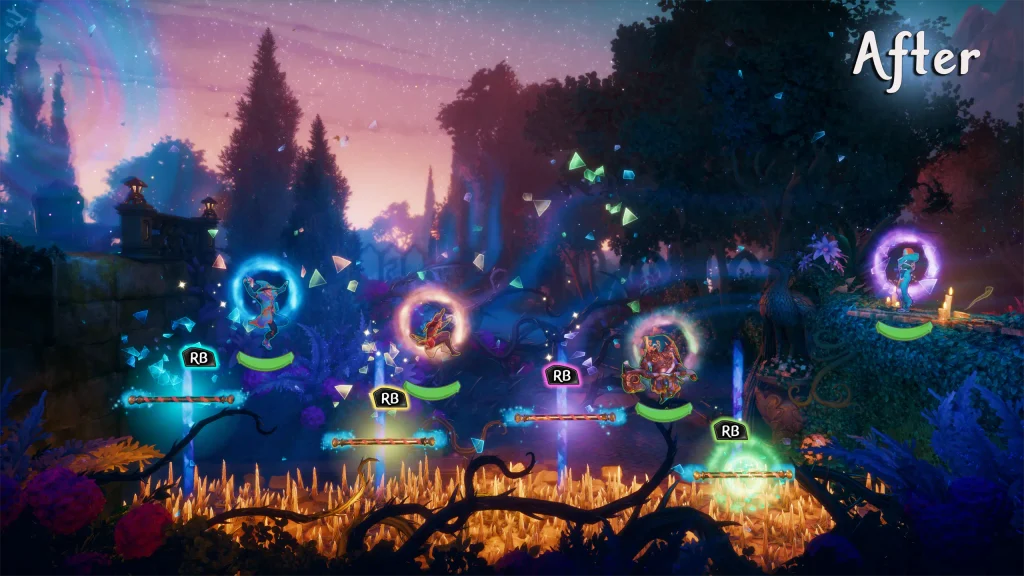
Take the spike pit above. In the original version, one player stayed at an interaction point to move platforms for their friends. Once someone reached the other side, they took over from a second interaction point to help the remaining player cross.
In the updated version, each player can control a platform while moving their own hero through the scene. You’re still working together to get everyone across, with fewer stops to take turns at fixed interaction points.
For puzzles where you still need to stay in place while controlling an element, we’re working on a way to activate that interaction with a button press from anywhere within a designated area. This lets us use one clear marker for the area instead of several separate interaction points.
Knowing who controls what
When you’re working through a puzzle, it should be easy to tell which parts you can control.
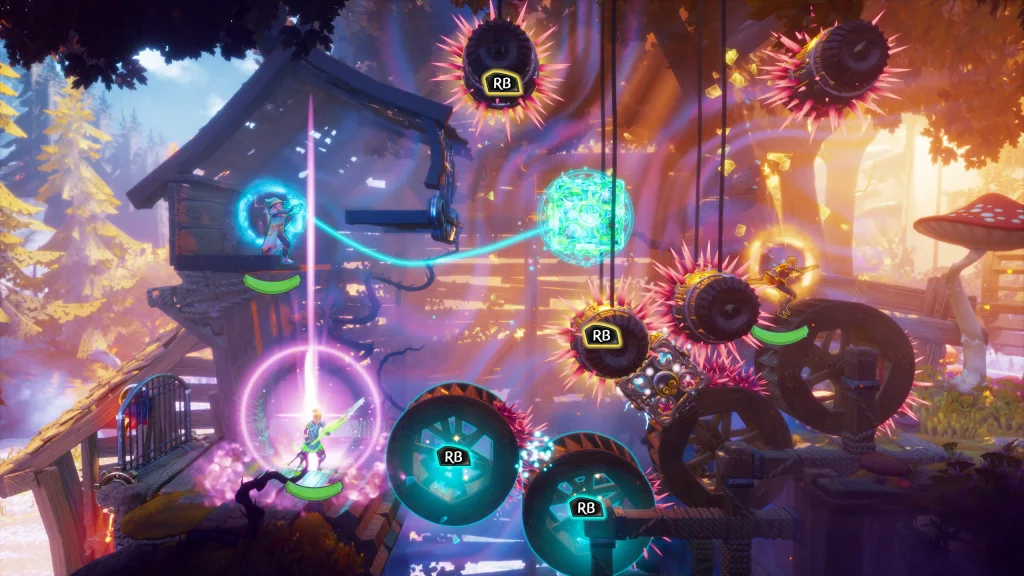
Previously, that connection wasn’t always clear. We’ve now added outlines in each player’s color around the button prompts on the puzzle elements they control. At a glance, you can see which parts are yours to operate and which ones your friends are handling.
Thank you
Thank you to everyone who joined the July and October playtests and took the time to share your thoughts. Your feedback has helped us understand where things felt restrictive or confusing and make changes to improve the adventure.
This work is a big part of why we took the extra development time. We’re still tuning, and we’ll keep sharing updates as we get closer to launch.
Trine 6: Together in Time launches March 4, 2027. If you have thoughts on the camera, puzzles, or anything else, come join us on Discord!

-Frozenbyte and Cooldown Games
Previous post
« Trine 6: A Closer Look at Classic and Freestyle Puzzle Modes